Open any camera menu or video editing application and you will find a wall of codec options — H.264, HEVC, ProRes, DNx — each with its own combinations of bit depth, color sampling, and container formats. For most people, it is overwhelming enough to just leave everything on default and hope for the best.
The problem is that codec choice touches every stage of production. What you record in the camera determines how smoothly you can edit, how much creative latitude you have in the color grade, and whether your finished video meets the technical requirements of the platform or broadcaster you are delivering to. Getting it wrong at the capture stage can create problems that no amount of post-production can fix.
In this guide, we’ll break down the fundamentals of codecs, containers, frame types, color sampling, and bit depth, and walk you through practical decisions you need to make when choosing the right codec for your projects. By the end, you’ll have a clear framework to balance quality, storage, and hardware requirements for any type of production.
Codec Fundamentals
The word "codec" is a portmanteau of encoder and decoder. An encoder compresses raw video data into a smaller, more manageable file. A decoder does the opposite — it reads that compressed file and reconstructs the image for playback. Every time you record a video on a camera or watch footage in an editing timeline, both processes are happening in the background.
A simple way to think about it: imagine taking a high-resolution photograph and saving it as a compressed JPEG. The encoder reduces the file size by discarding data the eye is unlikely to notice. When you open that file, the decoder reconstructs the image for display. Video codecs work on the same principle, except they are doing this across thousands of frames per second, in real time.
Codec vs. Container: Decoding the Basics
In professional video production and live streaming, selecting the correct video format is critical. The configuration chosen during capture sets the absolute ceiling for image quality, timeline performance, and final delivery compatibility. However, misspending bandwidth or choosing an incompatible format often stems from a fundamental misunderstanding: confusing a codec with a container.
To optimize workflows, technical teams must distinguish between these two components:
The Container (File Format): Represented by extensions like .mp4, .mov, or .mxf. A container is a wrapper that packages video tracks, audio tracks, metadata, timecode, and subtitles into a single file.
The Codec (Compression Standard): Represented by standards like H.264, HEVC (H.265), or Apple ProRes. The codec is the underlying mathematical algorithm used to encode (compress) raw sensor data and decode (decompress) it for real-time playback.
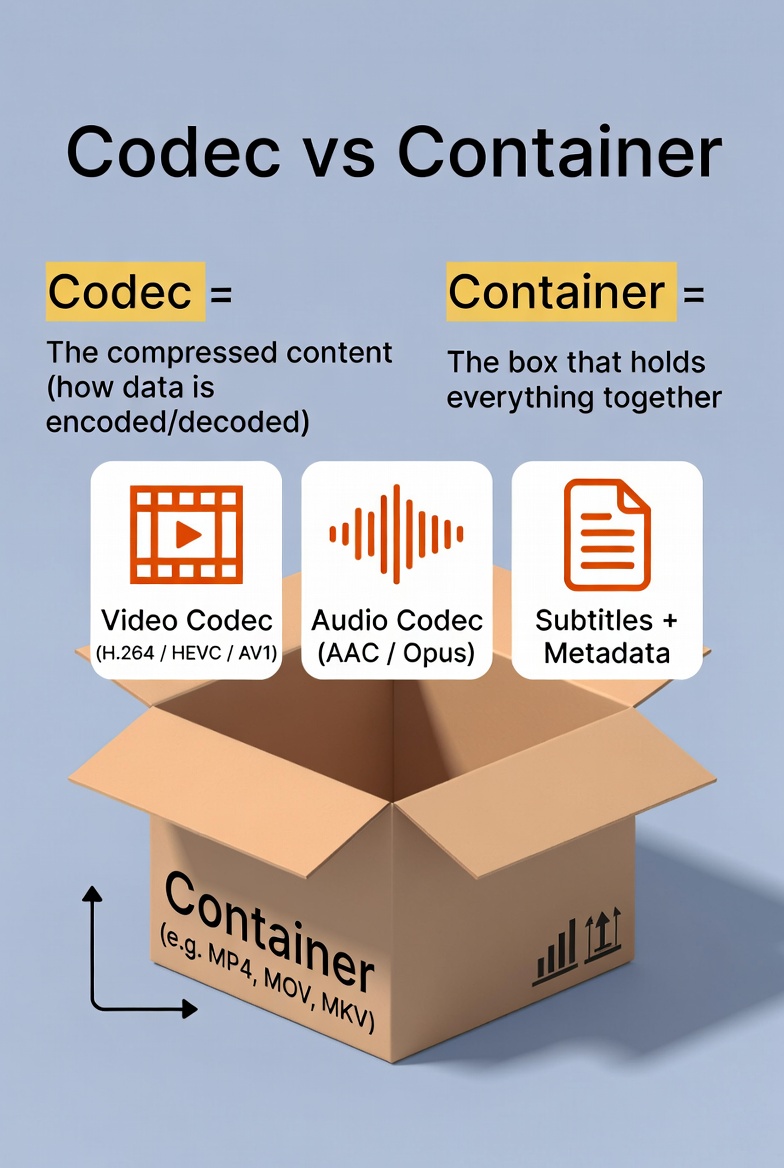
Why this matters for Pro AV teams: Informing a production crew or a system integrator that you shot in "MOV" provides no actionable technical clarity. MOV is merely the container; the crucial information lies in whether the video payload inside is encoded in a highly compressed inter-frame codec like HEVC or a visually lossless mezzanine format like ProRes.
Why Uncompressed Video is Ruining Your Storage
Uncompressed video streams require massive, impractical data rates. For instance, a standard definition video stream demands approximately 221 Mbps, meaning a brief 30-minute recording would exhaust nearly 50 GB of storage. When scaling into enterprise 4K UHD resolutions, the required bandwidth becomes impossible for standard workstations to edit and entirely unfeasible for local networks to stream.
Video codecs solve this constraint by reducing data volume while preserving perceived image quality. By balancing the triangle of image quality, storage footprint, and processing overhead, engineering deliberate codec choices directly prevents downstream production bottlenecks.
How Codecs Work
At the heart of every codec is compression—reducing the amount of data required to represent video while maintaining acceptable quality. One key factor is bitrate, which measures how much data is used per second of video. Higher bitrates generally produce better-looking images but also larger files.
Codecs use techniques like macroblocks to reduce data. Think of a video frame as a mosaic made of small blocks. The codec analyzes these blocks, predicting and approximating pixel values so fewer bits are needed to store the image. If there aren’t enough bits, blocky artifacts may appear in your video.

Lossy vs. Lossless Codecs
Codecs can be lossy or lossless.
Lossy codecs remove some data to save space, ideal for everyday video, streaming, or quick-turnaround projects.
Lossless codecs preserve every detail, making them perfect for high-end post-production, color grading, or archival footage. While lossless files are much larger, they prevent any generational quality loss when converting or editing multiple times.
Intra-frame vs. Inter-frame Coding

Choosing a Codec: The Triangle
When selecting a codec, remember the triangle of considerations: quality, storage, and decoding complexity. High quality may require higher bitrates or sophisticated codecs, while low complexity ensures smoother playback but might increase file size. Understanding how codecs compress, preserve, and deliver video is key to making informed choices for shooting, editing, and delivering your content efficiently.
Advanced Features:
Chroma Subsampling & Bit Depth Explained
Understanding the macro-level differences between codecs is only the first step. To architect an efficient video pipeline, technical teams must master how a codec processes color and luminance data. In the professional AV space, saving network bandwidth while maintaining pristine image quality requires a delicate balance of Bit Depth and Chroma Subsampling.
Chroma Subsampling (4:2:2 vs. 4:2:0) in Professional PTZ Workflows
Because the human eye is significantly more sensitive to variations in brightness (luminance) than to variations in color (chrominance), video codecs employ chroma subsampling to compress files without apparent visual degradation.
The process is expressed as a three-part ratio (4:X:Y):
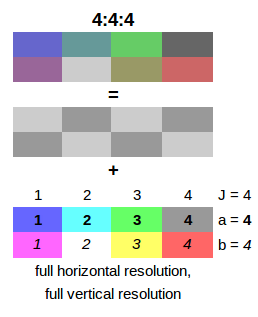
4:4:4
Full color and brightness resolution for every pixel, ideal for high-end visual effects and color grading.
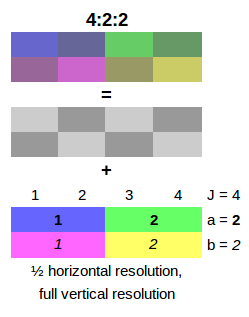
4:2:2
Luma (brightness) is full resolution, but chroma (color) is halved horizontally, offering a good balance of quality and storage.
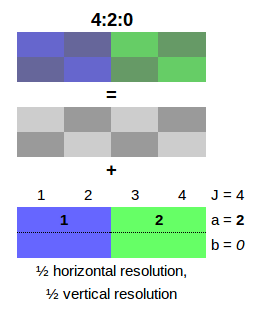
4:2:0
Chroma is halved both horizontally and vertically, the most common format for consumer video, streaming, and broadcast.
4:4:4 (Uncompressed Color): Luma and chroma are captured at identical resolutions. This format offers full color fidelity for every pixel—essential for high-end Hollywood visual effects and green-screen compositing, but practically unusable for live production due to astronomical bitrates.
4:2:2 (The Professional Standard): Horizontal color resolution is halved, but luminance remains at 100%. This provides an optimal equilibrium between file management and color precision.
4:2:0 (The Distribution Format): Color resolution is halved both horizontally and vertically, discarding 75% of the original color data. This is the global standard for consumer streaming, web delivery, and standard broadcast.
8-Bit vs. 10-Bit: Why Your Colors Break in Post-Production
Bit depth defines the precision of the color data captured by the camera sensor. It dictates how many shades of Red, Green, and Blue (RGB) can be recorded per channel:
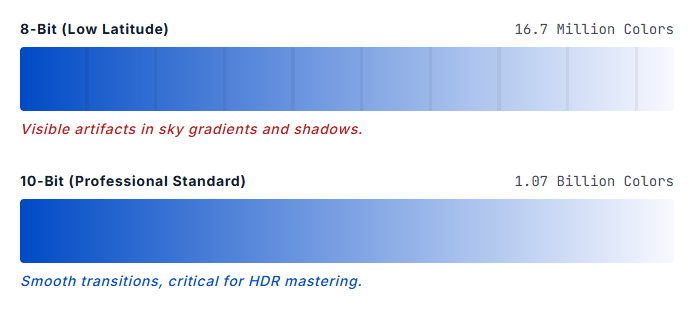
8-Bit Video: Provides 256 shades per channel, yielding roughly 16.7 million colors. While sufficient for standard web deployment, 8-bit files lack the mathematical data needed for modern production. If you shoot in log profiles or attempt heavy color grading on an 8-bit file, the lack of color gradients manifests as visible color banding (such as stepped artifacts in clear skies or smooth backdrops).
10-Bit Video: Provides 1,024 shades per channel, expanding the color palette to over 1.07 billion colors. This massive influx of data ensures seamless tonal transitions and delivers the precise information required for high-dynamic-range (HDR) workflows and rigorous post-production color refinement.
Why 10-Bit 4:2:2 Matters for Pro AV Integration
Codec Complexity vs. Hardware Decoding Efficiency
High-end color metrics require advanced mathematical compression to remain routable over networks. This introduces the concept of Codec Complexity:
Older standards like H.264 require less computational overhead but demand massive bandwidth to maintain 10-bit clarity.
Newer compression standards like HEVC (H.265) achieve superior compression—allowing you to route or stream higher-resolution, high-bitrate video at nearly half the file size of H.264.
Hardware Warning for Production Crews: While HEVC solves bandwidth bottlenecks, it introduces a significant challenge: Decoding Complexity. Playing back or editing highly complex HEVC Long-GOP files using pure software decoding (the CPU) will choke even robust workstations. System integrators must verify that their production switchers and editing bays utilize dedicated hardware decoding (via modern GPUs or dedicated ASIC chips) to guarantee smooth, low-latency performance during live operations.
The Production Workflow:
Choosing the Right Codec at Every Stage
Optimizing a video production ecosystem requires mapping the correct codec to each unique stage of the pipeline. A common operational error is using a single compression standard across the entire lifecycle. To balance image fidelity, network bandwidth, and computing performance, technical teams should implement a multi-tiered codec strategy based on the deployment blueprint below:
Shooting
Editing
Delivery
Capture Stage: Setting the Quality Ceiling
The codec selected during acquisition sets the absolute technical ceiling for the entire project. Data, color depth, and dynamic range discarded by the camera sensor during recording cannot be recovered or artificially re-introduced in post-production.
High-Turnaround & Social Delivery: For workflows requiring immediate distribution with minimal post-production, capturing in 8-bit 4:2:0 H.264 remains a universally compatible baseline. Because it decodes natively on virtually all modern consumer hardware, files can be reviewed or deployed immediately. However, this format offers zero latitude for heavy color grading or log color profiles.
Professional AV & Live Production: For environments involving multi-camera setups and dynamic environments, a minimum of 10-bit 4:2:2 encoding (via HEVC or high-bitrate H.264) is required. Utilizing HEVC allows production teams to preserve subtle skin tones and sharp graphical details—such as text on presentation slides or LED video walls—at significantly lower network bitrates than legacy standards.
High-End Master Recording: When storage constraints are secondary to pristine fidelity, mezzanine formats like Apple ProRes 422 HQ or Avid DNxHR are the broadcast industry standards. These intra-frame codecs record every frame independently, completely eliminating inter-frame compression artifacts at the expense of massive local storage consumption.
H.264 8-Bit
Prioritizes speed and low storage impact. Ideal for social media or rapid turnaround news coverage where color grading is minimal.
10-Bit 4:2:2
The professional standard for flexibility. Allows for significant color grading and skin tone refinement without visual artifacts.
ProRes / DNxHR
High-end mezzanine formats. These offer near-lossless quality and extremely low CPU overhead at the cost of massive file sizes.
Editing Stage: Solving Timeline Lag with Proxy Workflows
While high-efficiency codecs like HEVC (H.265) Long-GOP are optimal for maximizing network bandwidth and on-camera storage, they introduce severe computation bottlenecks during post-production. Because inter-frame codecs require the CPU to calculate mathematical differences across dozens of frames simultaneously, multicam timelines or effects-heavy sequences will inevitably suffer from dropped frames and interface lag.To resolve this hardware strain, professional teams implement a Proxy Workflow:
Ingest & Generate: Upon importing high-resolution camera files into NLE platforms (such as Adobe Premiere Pro, DaVinci Resolve, or Final Cut Pro), the system generates lightweight, low-bitrate proxy files (typically 8-bit H.264 or ProRes Proxy).
Offline Edit: The editor cuts, trims, and structures the timeline utilizing these lightweight proxies, ensuring smooth playback regardless of workstation hardware limitations.
Online Conforming: Prior to color grading and final rendering, the NLE automatically relinks the timeline back to the original 10-bit 4:2:2 camera source files, ensuring maximum data precision during export.
Delivery Stage: Exporting for Web, Streaming, or Broadcast
The final delivery codec depends entirely on the technical specifications of your distribution platform.
Web and OTT Streaming: H.264 inside an MP4 container remains the global industry standard for standard web deployment due to its unparalleled device compatibility. For 4K UHD or HDR content, HEVC (H.265) is heavily preferred by modern platforms to maintain ultra-high-definition clarity while compressing the network delivery payload.
Broadcast and Master Archiving: Television networks, system integrators, and festival platforms typically reject highly compressed inter-frame MP4 files. Deliverables for these sectors require high-bitrate mezzanine masters—such as ProRes 422 HQ or DNxHR wrapped in an .MXF or .MOV container—ensuring the video can be transcoded or archived repeatedly without generational quality loss.
Summary: Developing a Future-Proof Codec Framework
Selecting a video codec is not about finding a single, universally superior format—it is about strategically matching the right compression standard to each precise link in your production chain. What you record in-camera sets the absolute ceiling for image fidelity; how you configure your editing suite determines your pipeline efficiency; and your final delivery codec determines the quality your audience actually perceives.To streamline operations and mitigate hardware bottlenecks, professional teams should adopt this standardized baseline:
Acquisition: Record in 10-bit 4:2:2 HEVC to maximize dynamic range and color preservation while controlling network or card bandwidth.
Post-Production: Deploy 8-bit H.264 or ProRes Proxies to maintain a lag-free editing timeline regardless of multicam complexity.
Mastering & Archiving: Export an uncompressed mezzanine master in ProRes 422 HQ before generating platform-specific distribution formats.