
PTZ Camera Optical Zoom Explained
How to Calculate Field of View for Any Room
When someone asks "how much zoom do I need for this room," the answer almost never starts with a zoom number. A 20x optical zoom PTZ camera in a small conference room and the same camera in a large auditorium produce completely different results — not because the camera changed, but because the distance did.
Optical zoom specifications tell you the ratio between a camera's widest and most telephoto focal length. They don't tell you what the camera will actually see in your specific space. For that, you need two pieces of information: the zoom specification, and the distance from the camera to the subject. Put those two numbers together, and you can calculate exactly how wide or how narrow the camera's field of view will be — and how much of the physical space it will cover at any zoom level.
That is what Telycam's Optical Zoom Calculator is built to do. Enter the distance from the camera lens, and it returns the horizontal field of view in degrees, and the actual width and height coverage in meters, across the full zoom range — from wide end to fully telephoto. This article explains the concepts behind those numbers, so you know how to interpret the results and use them to make the right camera placement and zoom selection decisions for your space.
What Is Optical Zoom, Really?
Optical zoom is a camera’s ability to magnify a distant subject by physically adjusting the lens elements inside the camera. Instead of enlarging an existing image, the lens changes its focal length to bring the subject closer while maintaining image detail.
A simple way to imagine optical zoom is switching from a wide window view to looking through a telescope. The view becomes narrower, but the distant subject appears larger and clearer without sacrificing image quality.
Unlike digital zoom, which simply crops and enlarges part of the image, optical zoom creates real magnification through the lens itself.
This is where most purchasing decisions go wrong. A 20x zoom number tells you the range of magnification available, but it says nothing about what the camera will actually see in a specific room. Two cameras can both be labeled "20x optical zoom" and produce completely different fields of view, because field of view depends not just on focal length but on the camera's sensor size. A larger sensor produces a wider field of view at the same focal length than a smaller one — which means zoom numbers alone are not comparable across different camera models without knowing the sensor specification.
Optical Zoom vs. Digital Zoom: Why the Distinction Matters
Optical zoom achieves magnification by physically adjusting the lens elements — changing the focal length through actual glass movement. The image quality at any zoom level is determined by the full resolution of the sensor, because the entire sensor is being used to capture the image at that focal length.
Digital zoom works differently. It takes the image the sensor has already captured and crops into the center of it, then enlarges that cropped portion to fill the frame. No additional detail is captured — the same number of pixels is simply spread across a larger apparent area. The result is a magnified image with reduced sharpness and detail, equivalent to cropping and scaling in post-production.
Imagine taking a photo on your phone, cropping the center portion, and stretching it back to full size. The subject appears larger, but no new detail has been added. As you increase digital zoom, the image usually becomes softer and less detailed.
For live production, this distinction is consequential. A PTZ camera with 30x optical zoom at its maximum telephoto end is using the full sensor to capture a narrow field of view with full resolution. The same camera using digital zoom beyond its optical range is delivering a degraded image — more magnification, less usable picture quality. When evaluating PTZ cameras for a specific deployment, optical zoom range is the relevant specification. Digital zoom is not a substitute.
Understanding Your
Optical Zoom Calculator Results
An Optical Zoom Calculator is designed to answer one essential question: From a specific shooting distance, how much of a scene will your camera actually capture?
Instead of guessing whether a PTZ camera can properly frame a stage, speaker, or large venue, the calculator precisely estimates the camera's visual coverage at both extremes of its optical range—fully zoomed out and fully zoomed in.
Once you input the shooting distance, the calculator generates six key coverage metrics: Wide HFoV, Narrow HFoV, Wide Width, Wide Height, Narrow Width, and Narrow Height. While these specs might seem dense at first glance, they simply describe the camera's field of view from two perspectives: the broadest shot possible versus the tightest close-up achievable.
Wide vs. Narrow: Understanding the Optical Range
Every PTZ camera operates across two viewing extremes:
• Wide (Fully Zoomed Out): The lens captures the broadest possible view of your space—such as an entire stage, a large classroom, or a sports field. Think of it as stepping back to look at the whole room with your naked eyes.
• Narrow (Fully Zoomed In): The lens zooms in to magnify a small target area in crisp detail—such as a presenter’s facial expressions or an athlete’s movement. It’s like picking up a pair of binoculars to focus directly on a single person across that same room.
By evaluating both extremes simultaneously at your specified shooting distance, the calculator reveals the full operational reach of the camera's zoom lens.
Understanding HFoV (Horizontal Field of View)
Wide HFoV and Narrow HFoV measure the camera's optical viewing angle in degrees at both ends of its zoom spectrum:
• A larger degree value means a broader "viewing cone"—capturing a wide arc of the scene directly in front of the lens.
• A smaller degree value narrows that cone into a magnified "tunnel"—focusing deeply on a far-off subject while cutting out the surroundings.
While degree metrics are essential for spec-sheet comparisons, angles alone don't intuitively tell you how many meters of stage space you will actually capture in a real venue.
That is where the calculator's Width and Height values come in—translating these optical angles into actionable, real-world physical measurements for your specific installation distance.
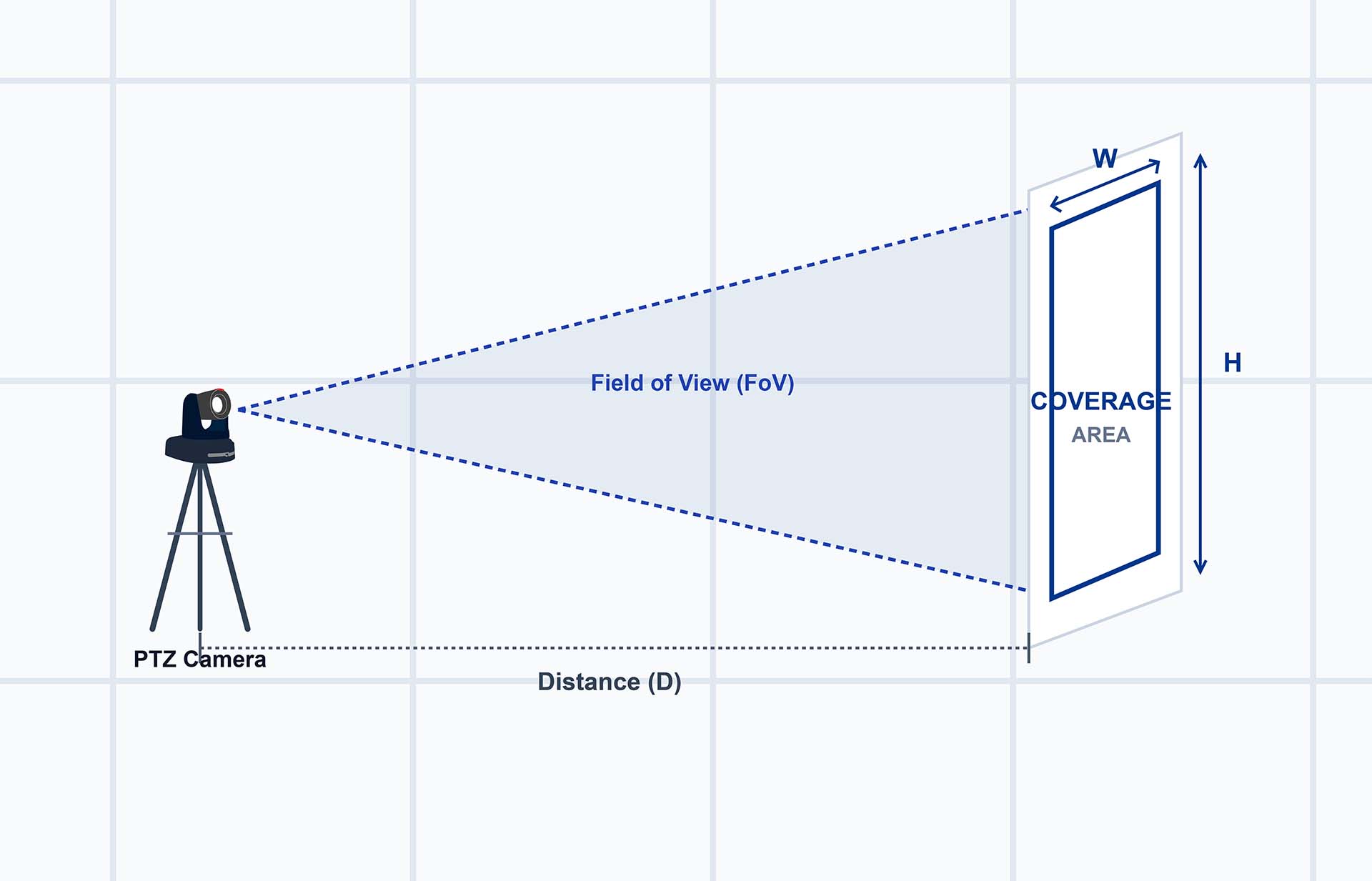
Width and Height: Practical Dimensions for Site Planning
While degree angles explain optics, Width and Height define the real-world physical area—in meters or feet—that your camera covers on the ground at your specified shooting distance:
• Wide Width & Wide Height: The maximum physical frame captured when the lens is fully zoomed out.
• Narrow Width & Narrow Height: The precise subject area framed when the lens is fully zoomed in.
These are often the most critical numbers for real-world deployment decisions.Imagine you are integrating a system for a 10-meter-wide stage. If the calculator shows a Wide Width of only 7 meters at your planned mounting position, you immediately know the camera cannot capture the full stage. Without installing a single bracket or running a single cable, the data clearly indicates you need to move the camera further back, select a model with a wider baseline lens, or adjust your mounting location.
By converting raw optical physics into actionable physical dimensions, the calculator eliminates guesswork and validates your deployment plan before on-site installation begins.
A Practical Example
Reading All Six Numbers Together
18-Meter House of Worship Deployment
To make these values concrete, consider a typical house of worship scenario: a PTZ camera mounted at the back of the room, 18 meters from the stage.
At that distance, a 20x zoom camera might return values like these:
Reading these numbers together tells a complete planning story:
• At wide angle, the camera covers 20.78 meters horizontally and 11.69 meters vertically — enough to capture a large stage with room to spare, or a wide establishing shot of the entire space
• At full telephoto, the coverage narrows to just 1.01 meters wide and 0.57 meters tall — tight enough to frame a single presenter in a close-up head-and-shoulders shot
• The jump from 20.78 meters to 1.01 meters represents the full zoom range available from this camera position — every framing option between those two extremes is accessible without moving the camera
One Thing That Surprises Most People
Looking at the calculator data for 20x, 30x, and 35x cameras, something stands out: all three have the same Wide HFoV of 60°. At 18 meters, all three return exactly the same Wide Width of 20.78 meters.
Higher zoom doesn't make the wide end wider — it makes the telephoto end narrower. A 30x camera doesn't give you a broader establishing shot than a 20x camera. It gives you a tighter close-up at full zoom. This is one of the most common misunderstandings in PTZ camera selection, and the calculator makes it immediately visible.
How Distance Changes Everything
Of all the variables that affect what a PTZ camera can see in a room, distance is the most significant — and the most frequently overlooked. Zoom specification gets most of the attention during camera selection, but in practice, where you place the camera relative to the subject determines the outcome far more than which zoom model you choose.
The Relationship Is Linear
The mathematical relationship between distance and coverage is straightforward: double the distance, and the width and height coverage double as well. Move the camera twice as far from the subject, and every value in the calculator output scales up proportionally.
This means that camera placement is not a fixed decision that happens after the camera is chosen — it is a variable that fundamentally changes what any given camera can do in a space. A 20x camera that can't cover a wide enough stage from 10 meters away may cover it comfortably from 15 meters. A camera that produces a useful close-up from 20 meters may be too tight to use from 30 meters at the same zoom setting.
The Same Camera, Three Different Distances
To make this concrete, here are the actual calculator outputs for a 20x camera at three different distances:
At 8 meters
The wide end covers 9.24 meters — enough for a small meeting room or a tight stage setup. The narrow end covers just 0.45 meters — a very tight close-up, suitable for framing a face at short range.
At 18 meters
The wide end expands to 20.78 meters — broad enough for a large auditorium stage or a full worship space. The narrow end at 1.01 meters is now a comfortable head-and-shoulders framing.
At 30 meters
The wide end reaches 34.64 meters — a very broad field of view that would cover even large venue stages. But notice that the narrow end is now 1.68 meters wide — what was a tight close-up at shorter distances has become a wider framing at 30 meters, because the same zoom angle covers more physical space at greater distance.
What This Means for Camera Placement
The practical implication is that camera placement decisions and zoom specification decisions cannot be made independently. They interact directly, and changing one changes the effective output of the other.
If a room has fixed camera mounting positions — wall brackets, ceiling mounts, or structural constraints that limit where the camera can go — the distance is fixed, and the zoom specification needs to be chosen to produce the right coverage at that distance. If the camera position is flexible, the distance can be adjusted to make a specific zoom specification work for the space.
This is exactly what the Optical Zoom Calculator is designed to support. Rather than guessing whether a 20x or 30x camera is the right choice for a room, you enter the actual distance from the mounting position to the subject — and the calculator tells you what each zoom specification will actually see from that position. The decision becomes concrete rather than speculative.
Real-World Scenarios:
Choosing the Right Zoom for Your Space
The zoom specification you need is determined by the distance between your camera and your subject — and nothing else. The scenarios below use actual calculator outputs to show what different zoom levels deliver in real production environments, along with the Telycam cameras that fit each context.

Scenario 01
Small Meeting Rooms (5–8 meters)
At this distance range, high zoom is rarely necessary — and can actually work against you. A wide field of view is more useful than telephoto reach when the subject is close and the room is small.
At 8 meters, a 10x camera returns:
The wide end covers 11.55 meters — more than enough for a standard conference table. The narrow end at 1.13 meters allows for a tight individual framing when needed. In most small meeting room deployments, the camera spends the majority of its time at or near the wide end, occasionally zooming in for a closer participant view.
For this scenario, Telycam's Meet series is purpose-built — designed specifically for conference and huddle room environments where ease of setup and wide-angle coverage matter more than long-distance zoom reach.
Scenario 02
Houses of Worship (15–25 meters)
This is the most common PTZ deployment scenario, and the one where zoom selection has the most visible impact on production quality. The camera needs to cover the full stage at wide angle while being able to zoom in tightly enough to frame a presenter in a usable close-up.
At 18 meters, here is what a 20x and 30x camera each deliver:
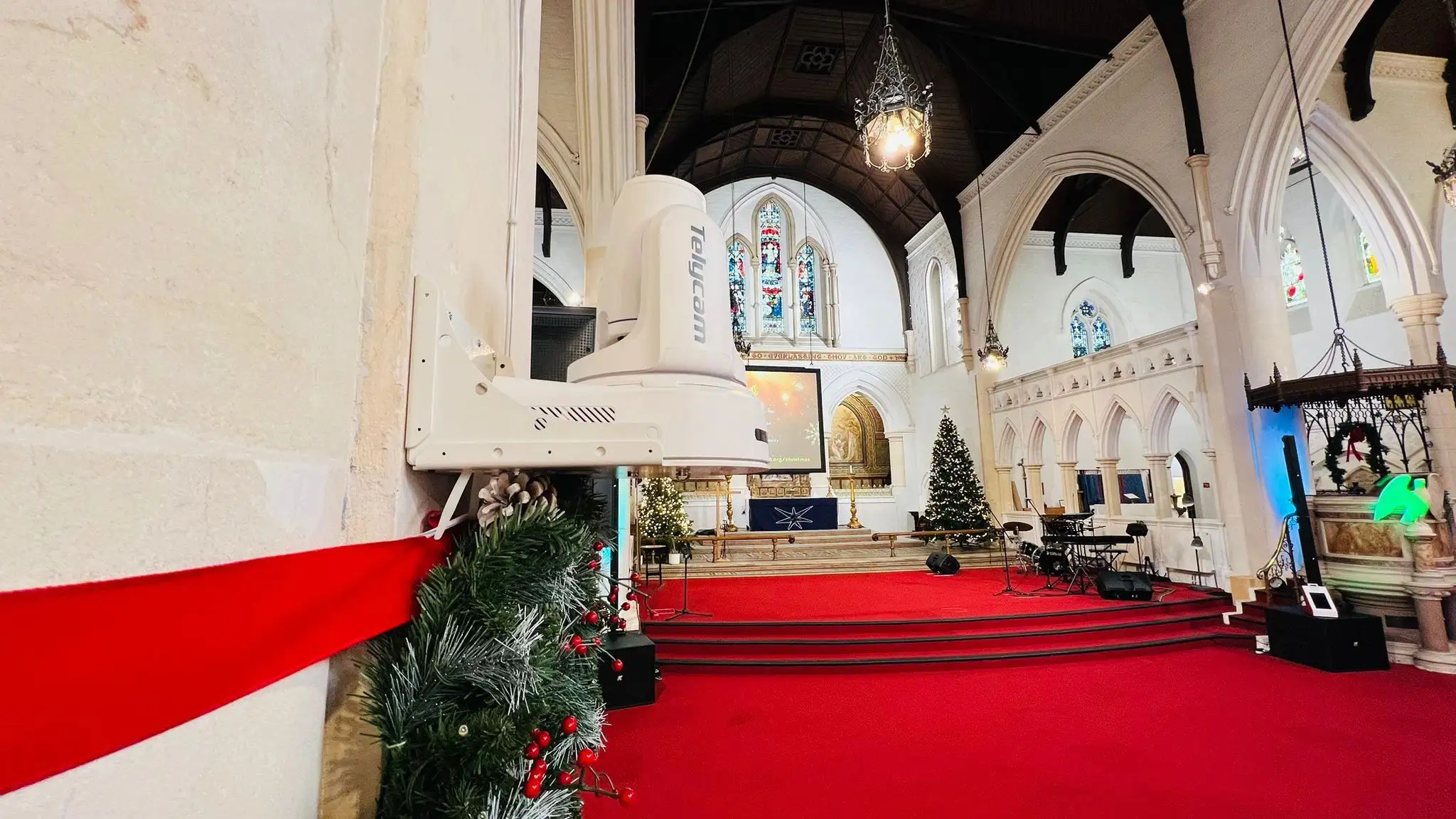
Both cameras produce identical wide-end coverage — 20.78 meters — because they share the same 60° Wide HFoV. The difference is at the narrow end: the 30x camera zooms in to 0.62 meters, producing a significantly tighter close-up than the 20x's 1.01 meters.
For most houses of worship at this distance, 20x provides a comfortable zoom range — wide enough for full-stage coverage, telephoto enough for a usable presenter close-up. If the camera is at the far end of a larger sanctuary, or if very tight facial close-ups are a production priority, 30x adds meaningful telephoto reach.
For 4K output at this distance, the Vision+ 4KN is available in both 20x and 30x configurations — choose based on how tight a close-up your production requires. For broadcast-grade requirements, the Explore (20x) covers this distance range with a 1-inch sensor, while the Explore SE (30x) adds additional telephoto reach for larger sanctuaries.
At this distance, the wide end of most PTZ cameras is broad enough to cover the full stage without difficulty. The critical question shifts to the narrow end: can the camera zoom in tightly enough to produce a usable close-up of a presenter at 30+ meters?
At 30 meters, a 20x vs 30x comparison:
Scenario 03
Large Auditoriums and Lecture Halls
(25–40 meters)
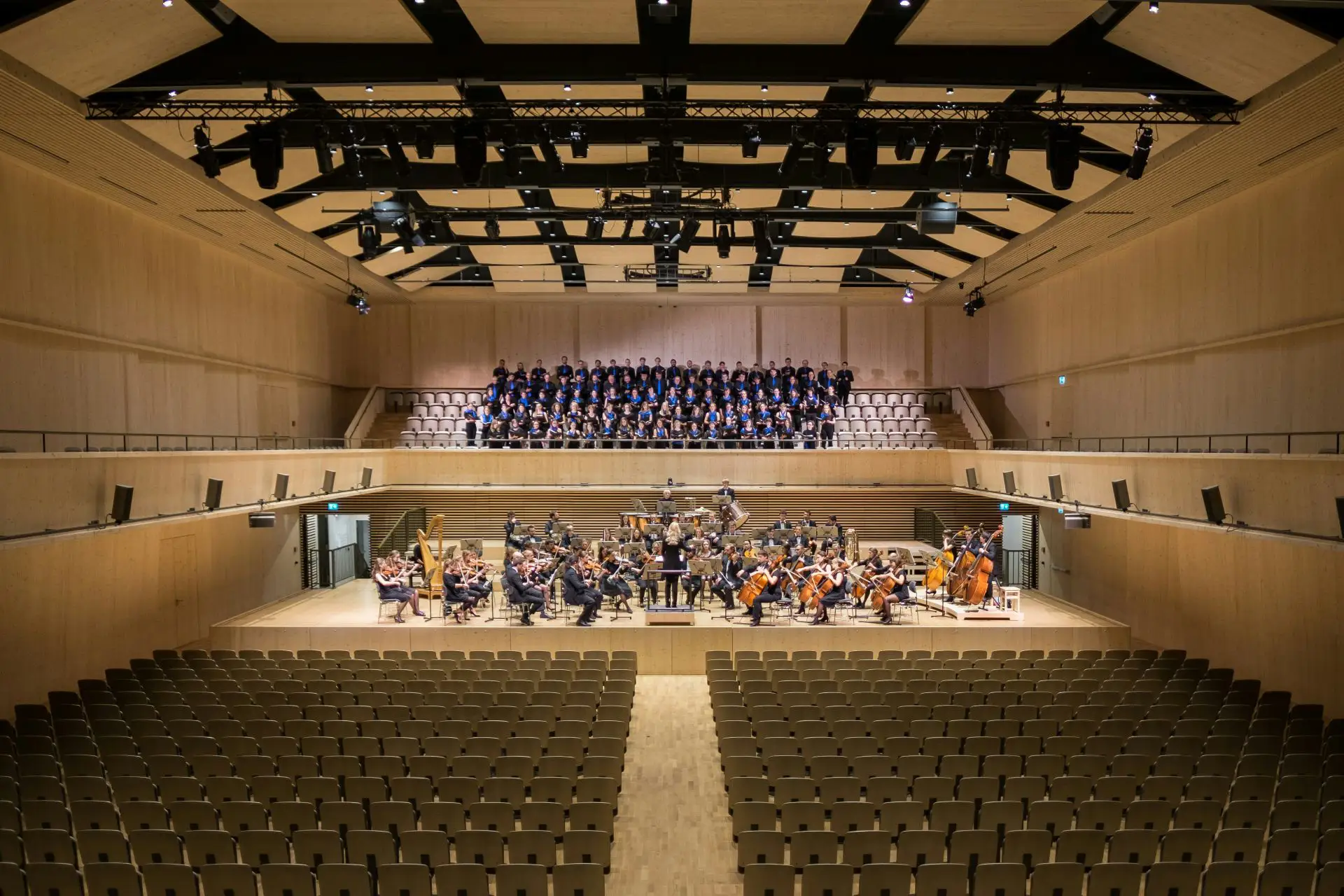
At 30 meters, the 20x narrow end covers 1.68 meters — a mid-shot framing rather than a tight close-up. The 30x narrows to 1.04 meters, producing a much more usable presenter close-up at this distance. For large auditoriums where close-up presenter shots are part of the production, 30x is the more appropriate specification.
The Vision+ 4KN 30x covers this scenario well for 4K production. For broadcast-grade deployments at this scale, the Explore SE with its 30x zoom and 1/1.8-inch sensor is the purpose-built option.
Scenario 04
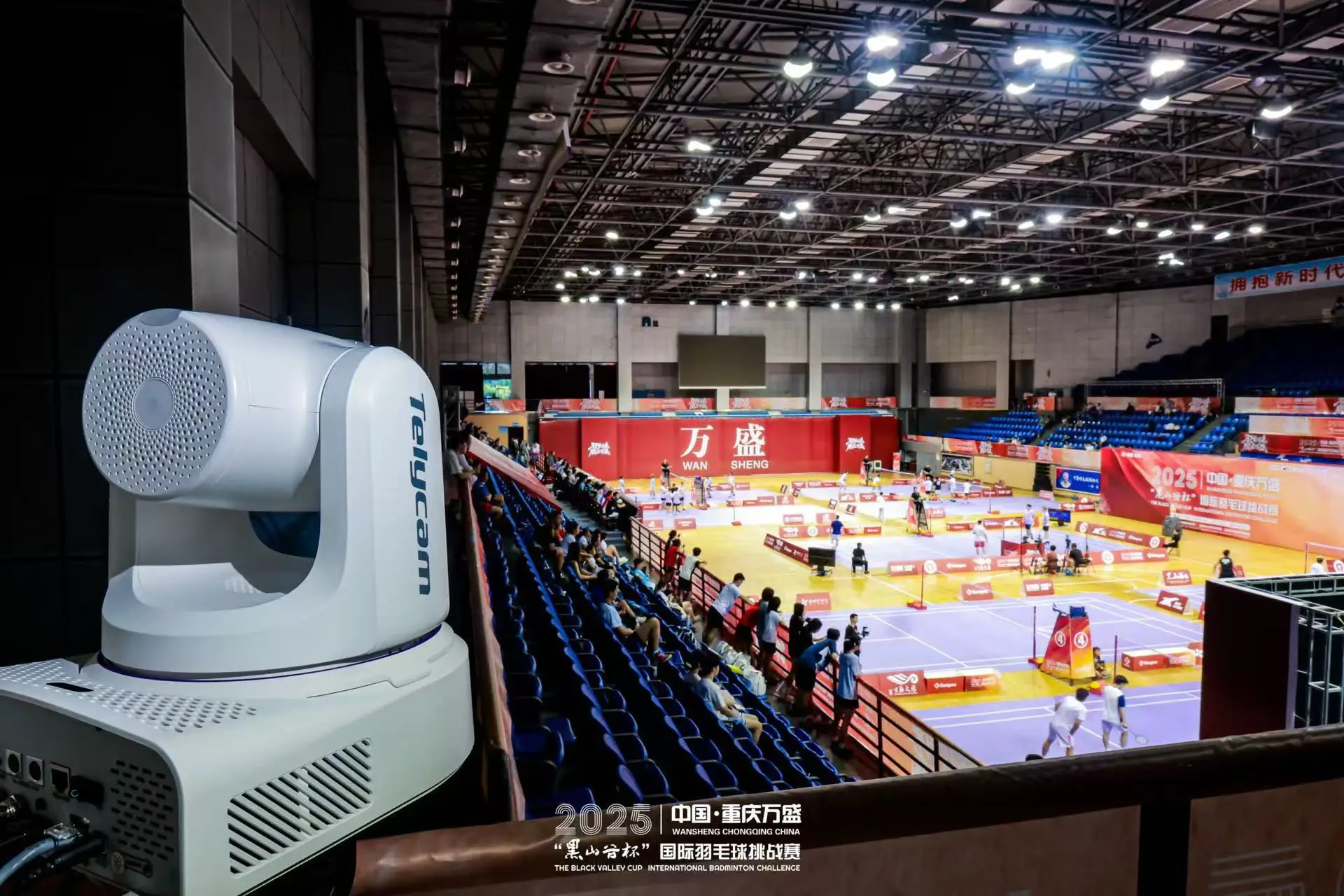
Large Venues and Sports Facilities
(50 meters and beyond)
At distances of 50 meters or more, the coverage numbers shift dramatically. Wide-end coverage becomes very broad — potentially too broad for practical use — while the narrow end determines whether the camera can deliver any usable close-up at all.
The wide end at 57.74 meters is too broad for most practical shots — at this distance, the camera will spend most of its time in the middle or upper range of its zoom, not at the wide end. The narrow end at 1.73 meters produces a reasonable presenter framing, though tighter than a traditional close-up.
For venues at this scale, 30x is the practical minimum for any usable telephoto reach. Camera placement strategy also matters significantly — a camera at 50 meters is often better served by being repositioned to 30–35 meters where the zoom range is more operationally useful across its full range.
The Explore SE (30x, broadcast-grade) is the appropriate specification for large venue deployments where both image quality and telephoto reach are non-negotiable requirements.
Conclusion
Choosing the right PTZ camera zoom specification does not have to be a guessing game.
Zoom ratio, shooting distance, and coverage are closely connected. Once you know where your camera will be installed and how far it is from the subject, you can predict what the camera will actually capture — before making a purchase or mounting decision.
The number on a product page only tells part of the story. A 20x optical zoom specification explains the lens range, but it does not tell you whether the camera can cover your stage, frame your presenter, or capture the detail you need from your specific location.
The more important question is:
What can this camera actually see from where it will be installed?
That is exactly what the Optical Zoom Calculator is designed to answer. Enter your shooting distance and camera specifications, and the calculator turns technical lens data into practical coverage information — helping you compare options and choose the right setup with confidence.
Whether you are planning a new PTZ installation, adjusting an existing camera position, or comparing different zoom models, understanding real-world coverage is the key to making a better decision.