
Telycam × Q-SYS Integration
The Telycam Q-SYS Designer plugin makes it simple to discover, connect, and control your Explore, Vision+, and Drive+ cameras right from the Q-SYS interface.
No complex setup. No extra hardware. Just seamless, centralized control for meetings, classrooms, and live productions.
From PTZ movements and auto-tracking to presets, exposure, and audio — everything you need to manage your cameras is now right where you need it, inside Q-SYS.
Key Features
PTZ Control
With VISCA over IP communication, you can pan, tilt, zoom, and focus with smooth precision — no external controller required.
Preset Management
Save and recall up to 64 camera presets, each with exact framing and focus settings.
Picture Control
Adjust exposure, white balance, and Genlock synchronization directly from the plugin — ensuring every feed matches perfectly across your system.
Auto-Tracking
From the Q-SYS interface, you can enable or disable auto-tracking and fine-tune its behavior — adjust tracking area, speed, and positioning to match your meeting or presentation style.
Audio & Video Settings
From encoding mode and resolution to input selection and phantom power, everything is centralized for a cleaner, faster setup process.
From Our Blog
Telycam x Q-SYS Integration Highlights
Streamline Corporate AV by Integrating Telycam with Q-SYS
How It Works
Get started with your Telycam PTZ cameras in Q-SYS in just a few simple steps:
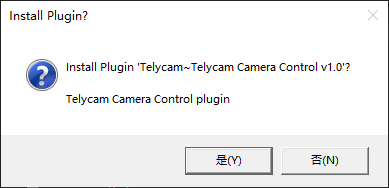
Download the Plugin: Download the Telycam Camera Control Q-SYS Plugin. Double-click the TelycamCamera.qplugx file on a Windows computer with Q-SYS Designer already installed.
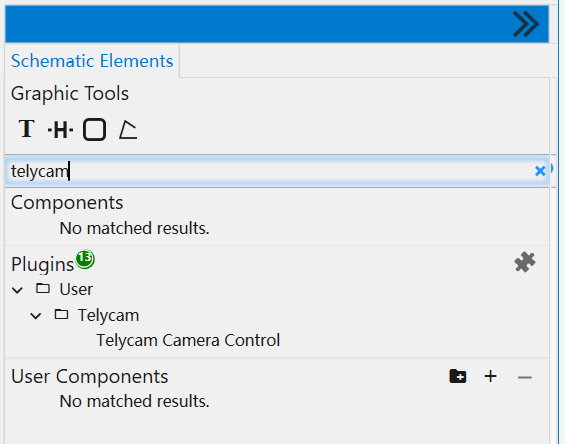
Locate the Plugin: After installation, find the plugin in the “User” folder of the “Plugins” section in the bottom right corner of Q-SYS Designer.
Tip: Use the keyword “Telycam” in the search box for quick access.
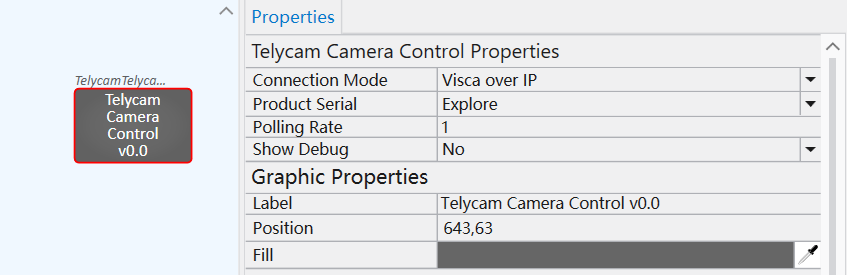
Add to Q-SYS Design: Once added, select the plugin to view its properties in the top right corner of the Q-SYS Designer.
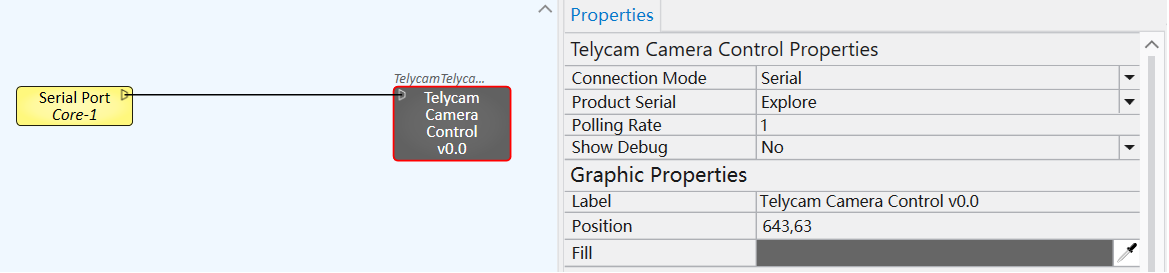
Connection Type: Choose the communication mode: ‘Visca over IP’ or ‘Serial.’ If ‘Serial’ is selected, a triangular symbol will appear on the left side of the plugin for connecting to a physical serial port on the core.
Looking for more details?
Get the full setup guide, or contact our team anytime at support@telycam.com.
Where Q-SYS Takes Command — Telycam Is Already There
Q-SYS-managed environments are built around a central control architecture — where audio, video, lighting, and display systems across every space are unified under a single, network-first platform. Telycam PTZ cameras integrate into that infrastructure via the dedicated Q-SYS plugin, bringing full camera control — including PTZ movement, auto-tracking, preset management, picture settings, and audio — directly into the Q-SYS ecosystem.
Enterprise Campuses & Corporate Headquarters
Centralize PTZ camera control across boardrooms, conference rooms, and presentation spaces — all managed within the Q-SYS platform alongside every other room system.

Cruise Ships & Hospitality Venues
Reliable, centrally managed camera integration for entertainment spaces, conference facilities, and public areas where consistent AV performance across multiple zones is essential.
Casinos & Gaming Floors
Professional PTZ camera control integrated into the broader Q-SYS AV environment — covering stages, event spaces, and high-traffic venues from a single control architecture.
Hotels & Convention Centers
Scalable camera deployment across ballrooms, meeting rooms, and event spaces, unified under one Q-SYS interface for seamless management across the entire property.
Theme Parks & Entertainment Venues
Purpose-built for large-scale, high-footfall environments where camera control, audio, lighting, and displays need to work together reliably across every zone, every day.
Unified AV Control for Modern Spaces
Telycam PTZ cameras work seamlessly with Q-SYS, providing a unified solution for managing video, audio, and room controls in meeting rooms, classrooms, corporate spaces, and broadcast setups. This integration enables remote control of pan, tilt, zoom, presets, and multi-camera workflows, while synchronizing with other AV devices for smooth video collaboration and professional-quality streaming.
The Telycam–Q-SYS combination simplifies deployment, enhances collaboration, and ensures consistent, high-quality audiovisual performance across any environment.
Contact Telycam
Sales Inquiries
sales@telycam.com
Call Us
+86-755-33275155
