
Mastering the NDI Ecosystem

Core Concepts and Real-World Setups

In video production, capturing a great shot is only half the battle — managing multiple cameras, sources, and angles efficiently is where the real challenge begins. That’s why the NDI workflow has become a game-changer. By connecting PTZ cameras and other video sources over a standard network, NDI simplifies setups, reduces cables, and gives creators real-time control.

In this guide, we’ll dive into the NDI ecosystem, exploring its core concepts, essential tools, and real-world setups — everything you need to master NDI and elevate your video production.

What is NDI?

NDI (Network Device Interface) is a high-performance, software-defined IP protocol that enables bi-directional transmission of high-definition video, audio, and metadata—including PTZ control and Tally—over Gigabit Ethernet infrastructure with minimal latency.

Why NDI Matters in Modern Video Production

NDI isn’t just about saving cables — it fundamentally changes how video production works, from small studios to large live events:

Simplified Infrastructure

One Ethernet cable can carry 4K video, audio, PoE power, and PTZ camera control all at once.

Broadcast-Grade Quality

IP-based but visually lossless, with frame-accurate precision up to 4K — perfect for live streaming or professional broadcasts.

Infinite Scalability

Easily add new sources, including PTZ cameras or smartphones, without extra physical inputs.

Cost-Efficient Remote Production

Small studios or distributed teams can create high-quality content using standard IT equipment, lowering barriers to professional video production.

In short: adopting an NDI workflow enables creators to manage multi-camera setups, maintain broadcast-grade quality, and produce content flexibly — whether in a small studio, a remote location, or across a network of teams.

NDI vs. Traditional Video Production:
SDI, HDMI, and Why the Industry Is Shifting

To understand what NDI brings to the table, it helps to understand what it is replacing — and why.

Traditional broadcast workflows are built around SDI (Serial Digital Interface) for professional environments and HDMI for prosumer and smaller setups. Both are point-to-point connections: one cable, one signal, one destination. Every camera feed requires its own dedicated run back to a central router or switcher. Adding a camera means pulling a new cable. Moving a camera means rerouting the signal chain. Scaling up means buying more hardware.

NDI takes a fundamentally different approach. Instead of dedicated video cables, signals travel over a standard Ethernet network — the same infrastructure already running in most facilities. A single network connection can carry multiple video streams simultaneously, in both directions, with automatic device discovery built in. No manual IP assignment, no patch panels, no proprietary routing hardware.

NDI vs SDI vs HDMI Comparison Table
Criteria SDI HDMI NDI
Infrastructure Dedicated coaxial cable per feed Dedicated HDMI cable per feed Standard Ethernet network
Max practical cable run ~100m (with amplification) ~15m (without extender) Limited only by network topology
Latency Sub-frame Sub-frame <1 frame (typically under 100ms)
Scalability Requires additional hardware per feed Very limited Add devices to the network
Bi-directional signaling No No Yes — video, audio, Tally, and control
Cost to scale High — hardware and cabling High — extenders and switchers Low — standard IT infrastructure
Remote collaboration Not practical Not practical Native network sharing

NDI High Bandwidth vs. NDI HX3: Choosing the Right Flavor

Not all NDI implementations are the same, and bandwidth requirements vary significantly depending on which version your devices use.

NDI High Bandwidth delivers visually lossless quality with the lowest possible latency — ideal for in-studio production where network capacity is not a constraint. At 4K 60fps, NDI High Bandwidth can require approximately 250Mbps per stream, which means careful network planning is essential in multi-camera environments.

NDI HX3 (High Efficiency) is the version most commonly found in PTZ cameras and field production equipment. It uses more efficient compression to bring bandwidth requirements down to approximately 60–80Mbps for high-quality 4K output — a significant reduction that makes multi-camera NDI workflows practical on standard gigabit networks without specialized switching infrastructure.

For most production environments, NDI HX3 represents the practical working standard: broadcast-quality output at a bandwidth footprint that standard IT infrastructure can comfortably support.


NDI is not a replacement for SDI in every context — high-end broadcast facilities with existing SDI infrastructure and sub-frame latency requirements have good reasons to stay with what they have. What NDI does is make professional-grade, multi-camera, scalable video production achievable on standard IT infrastructure — opening it up to organizations and productions that could never have justified the cost of a traditional broadcast build-out.

The Core Components of an NDI Workflow

An NDI workflow is best understood as a signal chain — each component has a defined role, and the output of one feeds directly into the next.

The network backbone

The network switch is the most important — and most commonly underspecified — piece of infrastructure in an NDI setup. You need a gigabit switch as a minimum; a standard 100Mbps switch will not handle multiple simultaneous NDI streams. Look for switches with IGMP Snooping support to manage multicast traffic efficiently, and PoE+ capability if you want to power PTZ cameras directly over the Ethernet cable, eliminating separate power adapters at each camera position.

Cameras — the capture layer

NDI-native PTZ cameras have encoding hardware built directly into the body, so they output an NDI stream over the network without any additional conversion hardware — plug into the switch, and the signal is immediately discoverable by any NDI-compatible software on the same network. The same cable that carries video also handles remote pan, tilt, and zoom control, Tally feedback, and power delivery. Telycam's NDI PTZ cameras support NDI HX3, delivering broadcast-quality 4K output at a bandwidth footprint — around 60–80Mbps — that keeps multi-camera gigabit networks practical.

Encoders and decoders — bridging legacy equipment

Encoders from manufacturers like BirdDog, Kiloview, and Magewell accept HDMI or SDI signals from traditional cameras and convert them into NDI streams, allowing DSLRs, cinema cameras, and legacy broadcast units to join the network without being replaced. Decoders do the reverse — outputting NDI as HDMI or SDI for monitors, projectors, or recording equipment that does not support IP video natively.

Production software — the brain

For software-based production, applications like vMix, OBS Studio, and Wirecast receive all NDI sources on the local network automatically — no manual IP configuration required — and allow operators to switch between feeds, mix audio, add graphics, and push the final output to a streaming platform or recording destination. For professional NDI workflows, vMix offers the most complete feature set, including multi-camera switching, replay, and native Stream Deck integration.

For productions that prefer a hardware-based approach, dedicated NDI-capable switchers such as the Telycam Mix One offer the tactile control and reliability of a physical production desk while maintaining full compatibility with NDI source discovery and switching — no separate computer required.

The control layer

Stream Deck devices are the most common control interface, allowing custom button layouts that trigger production software actions — cutting between cameras, fading audio, starting recordings — with a single keypress. Because NDI carries control data over the same network connection as the video signal, PTZ camera control requires no separate RS-232 or RS-485 cable. Mobile devices can also enter the signal chain here: apps such as Vizrt NDI Camera turn an iPhone into a live NDI video source, adding handheld angles without additional hardware.

Building Your Multi-Camera NDI Setup

A Practical Guide with Telycam
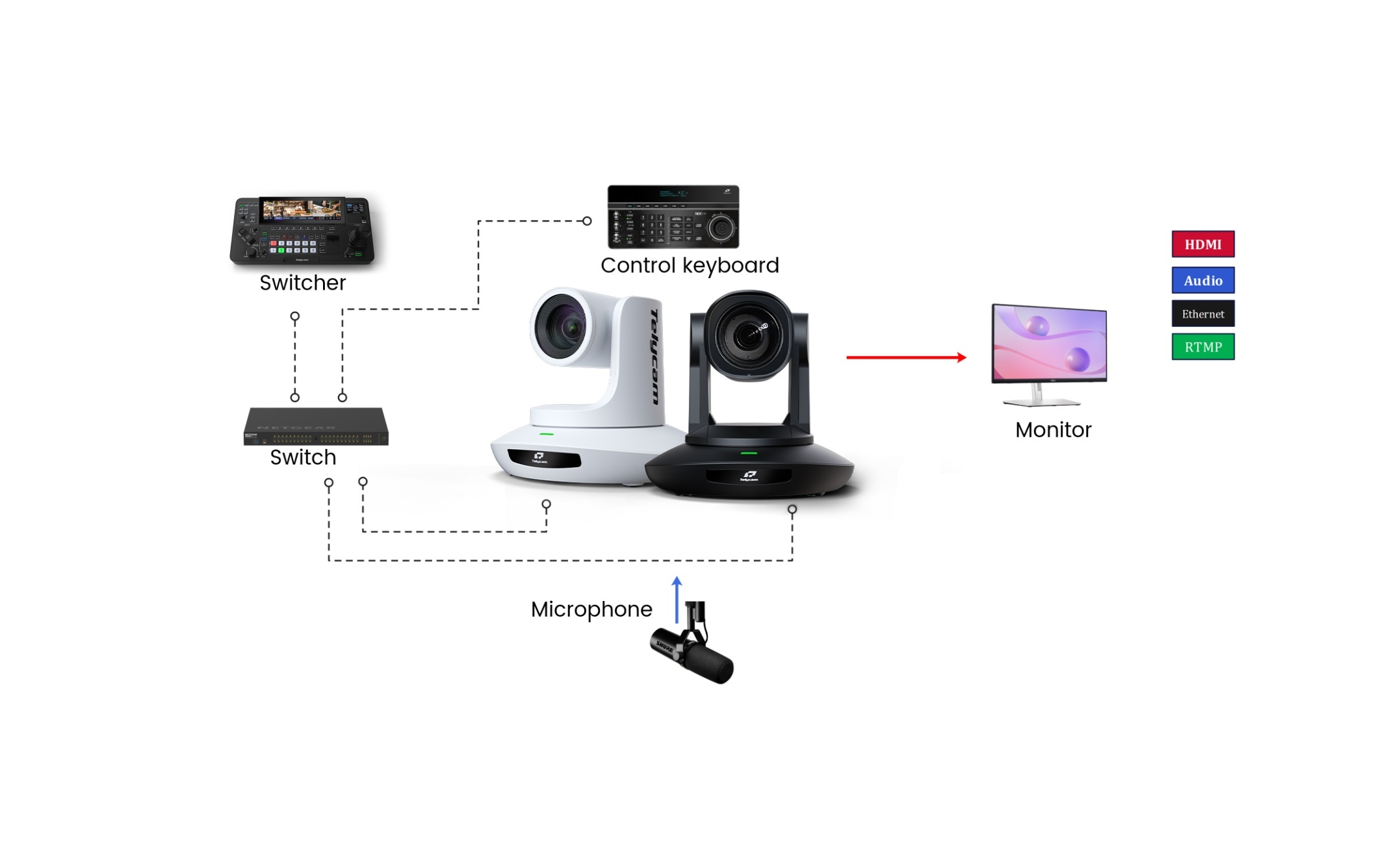
NDI workflow_Mix One

Setting up a multi-camera NDI workflow is significantly simpler than its traditional SDI equivalent. By using Telycam's NDI-native PTZ cameras, you can transform a complex production into a streamlined, single-cable process. Here is how a professional setup comes together.

The Power of One Cable

Connect each Telycam NDI PTZ camera to a PoE+ Gigabit switch. A single Ethernet cable carries high-quality video, bidirectional PTZ control, Tally feedback, and power simultaneously — no separate power adapters, no control cables.

Thanks to NDI’s auto-discovery protocol, cameras appear in your production software within seconds of being connected, with no manual IP configuration required.

Telycam cameras operate on NDI HX3, which delivers broadcast-quality output at approximately 60–80Mbps per stream. Compared to Full NDI — which can demand up to 250Mbps per 4K stream and requires careful network planning — NDI HX3 keeps multi-camera setups comfortably within the limits of a standard gigabit network, leaving headroom for control traffic and additional sources.

Integrating Legacy and Specialized Sources

Not every camera in your setup will be NDI-native. To expand your creative options without replacing existing equipment:

  • NDI Encoders: Connect cinema cameras or DSLRs to an encoder such as a Kiloview, BirdDog, or Magewell unit to bring HDMI or SDI signals into your NDI network. From the production software’s perspective, these sources appear identically to native NDI cameras.
  • Mobile Flexibility: An iPhone can serve as an additional NDI source for handheld or roving angles using a third-party app such as Vizrt NDI Camera — adding a dynamic perspective without investing in additional hardware.

Centralized Production and Audio

In a Telycam workflow, the Mix One hardware switcher serves as the central hub, receiving all camera feeds automatically via the network. For audio, the routing and processing integrate seamlessly with this hardware-centric approach:

  • Multi-channel mixing: An NDI-enabled mixer (such as the DLZ NDI) handles multiple microphone inputs and delivers a mixed audio feed directly into the Mix One over the network, keeping the entire signal chain IP-based.
  • Simpler setups: For single-presenter formats, professional microphones—such as the Rode NT-USB+, Shure MV7, or Blue Yeti—can be routed through compatible network converters or directly into the production environment to feed pristine audio into the system.


With the Mix One, operators gain precise, hardware-level physical feedback for camera cuts, graphics triggers, and recording controls directly from the console—significantly reducing cognitive load and maximizing reliability for small production teams.

Letting the Camera Do the Work

For productions running with minimal crew, Telycam’s AI auto-tracking ensures the presenter stays in frame automatically, removing the need for a dedicated camera operator on every PTZ unit. This is particularly valuable in education, corporate livestreaming, and house of worship environments where consistent framing needs to be maintained across long sessions without manual intervention.

See It in Action

Want to see how this workflow performs across different production environments?

Visit our [Use Cases page] to explore real-world Telycam deployments, or browse our [Solution Categories] — including Education, House of Worship, and Live Streaming — to find the configuration that fits your production.

Use case page

FAQs

What is the difference between NDI High Bandwidth and NDI HX3?

Full NDI delivers visually lossless video with the lowest possible latency, but requires significant bandwidth — up to 250Mbps per 4K stream. NDI|HX3 uses more efficient compression to achieve broadcast-quality output at around 60–80Mbps, making it the practical standard for multi-camera setups on standard gigabit networks. Most PTZ cameras use NDI|HX3.

PTZ cameras allow a single operator — or no operator at all — to control pan, tilt, and zoom remotely, covering multiple angles without additional crew. In an NDI workflow, a single Ethernet cable handles video, control, Tally feedback, and power simultaneously. Combined with AI auto-tracking, PTZ cameras can maintain consistent framing on a moving presenter throughout an entire production without manual intervention.

Viewers will tolerate imperfect video far more readily than poor audio. Distorted, echoey, or inconsistent sound breaks the viewer's attention immediately and undermines the credibility of the production regardless of how good the picture looks. Investing in proper microphones and a dedicated audio mixing solution is one of the highest-impact decisions in any video production setup.

The core NDI protocol is free to use for developers and end users. NDI Tools — a suite of utilities including Studio Monitor, Screen Capture, and Virtual Input — is available as a free download from NDI.tv. Some advanced features and hardware integrations may require licensed software, but the vast majority of NDI-based production workflows operate entirely on free tooling alongside standard production software like vMix or OBS.

Under typical local network conditions, NDI latency is under 100ms — roughly one to two frames at standard frame rates. For live switching and monitoring this is effectively imperceptible. Full NDI achieves the lower end of this range; NDI|HX3 sits slightly higher due to its encoding process, but remains well within acceptable limits for live production.

Yes — NDI|HX and NDI|HX3 are designed with bandwidth efficiency in mind, making Wi-Fi a viable option for camera sources in environments where running Ethernet cable is not practical. That said, hardwired Gigabit Ethernet is always the recommended choice for live production. Wi-Fi introduces variable latency, packet loss risk, and interference that can cause dropped frames at the worst possible moment.

Conclusion

NDI has fundamentally shifted what is possible in video production — not by replacing professional broadcast standards, but by making professional-grade, multi-camera production accessible on infrastructure that most facilities already own.

The workflows that once required dedicated cabling, proprietary routing hardware, and a large technical crew can now run over a standard gigabit network, controlled from a single operator position. A single Ethernet cable replaces an entire signal chain. Cameras discover themselves. Sources from across a venue — or across the world — appear in production software automatically.

For productions of any scale, mastering the NDI ecosystem means fewer compromises: better flexibility in how you position cameras, more creative freedom in how you structure a shoot, and significantly lower infrastructure costs without sacrificing output quality.

The technology is ready. The question is what you build with it.

Contact Telycam

Sales Inquiries

sales@telycam.com

Call Us

+86-755-33275155