
Upstream Key vs. Downstream Key
What's the Difference and When to Use Each
If you’ve ever worked on a live production switcher, you’ve likely hit this exact moment mid-show: a logo needs to go on screen, a lower third needs to appear, or a green screen layer needs to be built—and suddenly you’re hesitating between USK and DSK.
The truth is, the difference between USK and DSK is far more logical than it first appears. Once it clicks, you'll know instinctively where every graphic layer in your production belongs. This guide breaks it down from the ground up.
How a Video Switcher Processes Video:
Signal Flow Basics
Before diving into the difference between USK and DSK, it helps to understand one fundamental concept: video inside a switcher does not simply pass from input to output. It moves through a specific sequence of processing stages — and where a keyer sits in that sequence is what determines how it behaves.
Think of it like an assembly line. Each stage in the line does something to the video before passing it to the next. The order matters: something added early in the line gets treated differently than something added at the end.
In a video switcher, the core sequence looks like this:
[Input Sources] → [M/E Bus] → [Upstream Keyer] → [Transition Block] → [Downstream Keyer] → [Program Output]
Here is what each stage does:
Input Sources are your cameras, media players, graphics systems, and any other video feeds connected to the switcher. At any given moment, one of these is selected as the background on the M/E bus.
The M/E Bus (Mix/Effects Bus) is where the switcher holds the current background video — the main shot your audience is watching. When you press a source button to cut to Camera 2, you are changing what is on the M/E bus.
The Upstream Keyer sits inside the M/E bus, prior to the transition stage. Anything placed here is layered within the scene, allowing it to transition seamlessly alongside the background when a cut or dissolve is triggered.
The Transition Block is the engine room where cuts, dissolves, wipes, and other video effects are executed. When you trigger a transition, this stage blends your current M/E background and active USK layers into the next scene before sending the combined signal down the line.
The Downstream Keyer sits after the transition block, at the very end of the signal chain before output. Anything placed here is applied on top of the fully processed program signal — independently of whatever transitions are happening underneath.
The Program Output (PGM) is the finish line. This is the final, fully assembled master signal that is delivered directly to your live stream encoder, hardware recorder, or broadcast transmission system.
The position of the keyer in this chain is everything. Because the upstream keyer sits before the transition block, its content is part of the scene and participates in transitions. Because the downstream keyer sits after the transition block, its content is permanently layered on top of the output, unaffected by any switching activity below it.That single structural difference — before the transition versus after it — is the foundation for everything else this article covers.
Upstream Key (USK):Part of the Scene
The upstream keyer—USK for short—is located inside the M/E bus, prior to the transition block. This routing has one defining consequence: anything placed on the USK becomes an intrinsic part of the active scene.
Because it is processed within the M/E stage, the USK layer is tied to the local scene behavior. When you perform a mix or wipe transition between two different M/E setups, the USK content dissolves or wipes alongside the background. From the switcher's perspective, the upstream key and the background operate as a unified compositional layer handed together to the transition block.
This behavior is not a limitation; it is the core feature. It means the USK is purpose-built for content that must be visually integrated into the shot—elements that should feel like they belong inside the environment rather than floating arbitrarily on top of the final program feed.
What the USK Is Used For
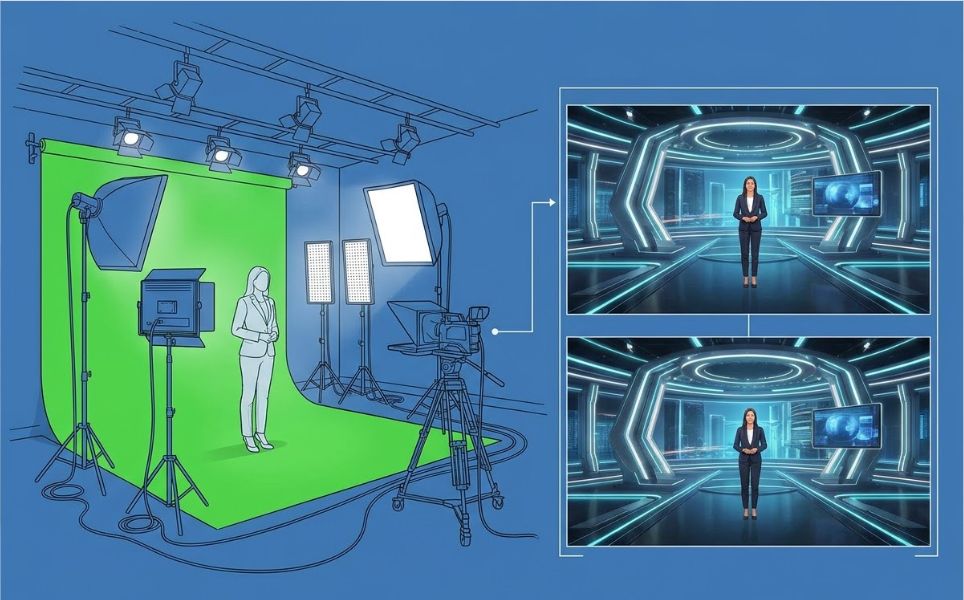
Green screen and virtual backgrounds
Chroma keying—isolating a subject against a green or blue background to composite them into a virtual environment—is a native upstream key function. The reason is straightforward: a presenter on a virtual set is an intrinsic part of the scene. When you execute a background transition to a different wide shot or angle, the keyed presenter must transition seamlessly with it, rather than remaining frozen on screen while the environment changes underneath.
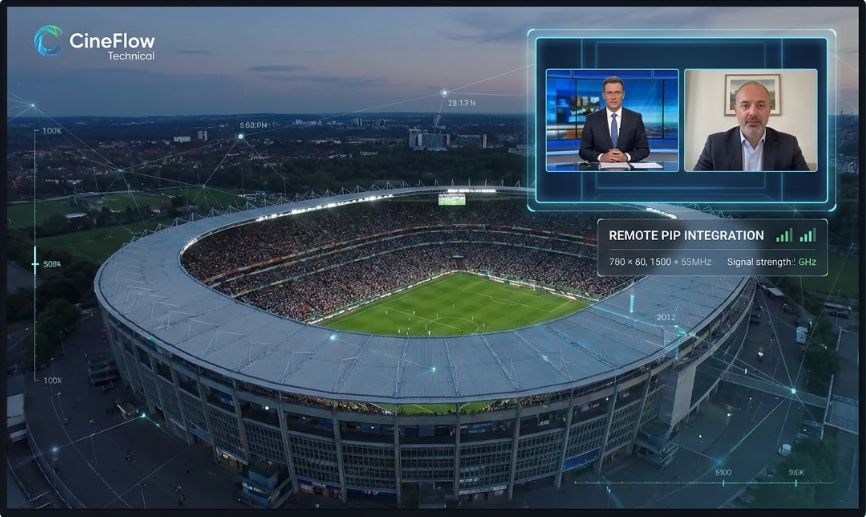
Picture-in-Picture (PiP)
Inset windows showing a secondary camera feed, a remote guest, or a replay source are typically built on the USK using the DVE (Digital Video Effects) function. Like chroma key, PiP is strictly scene-dependent—the inset should transition on and off screen as an intentional part of the production's visual flow, rather than remaining pinned to the output independently of what is happening on the primary program feed.

Pattern keys and DVE effects
Wipe borders, shaped mattes, and other geometric compositions that interact with the background are natively handled at the USK level. Crucially, while classified as a key type, Pattern Keys are most commonly utilized in live production as the underlying engine for Wipe transitions (such as circle, diamond, or box wipes). Processing these effects within the USK allows the geometric boundaries and the background elements to be perfectly synchronized prior to entering the transition stage.
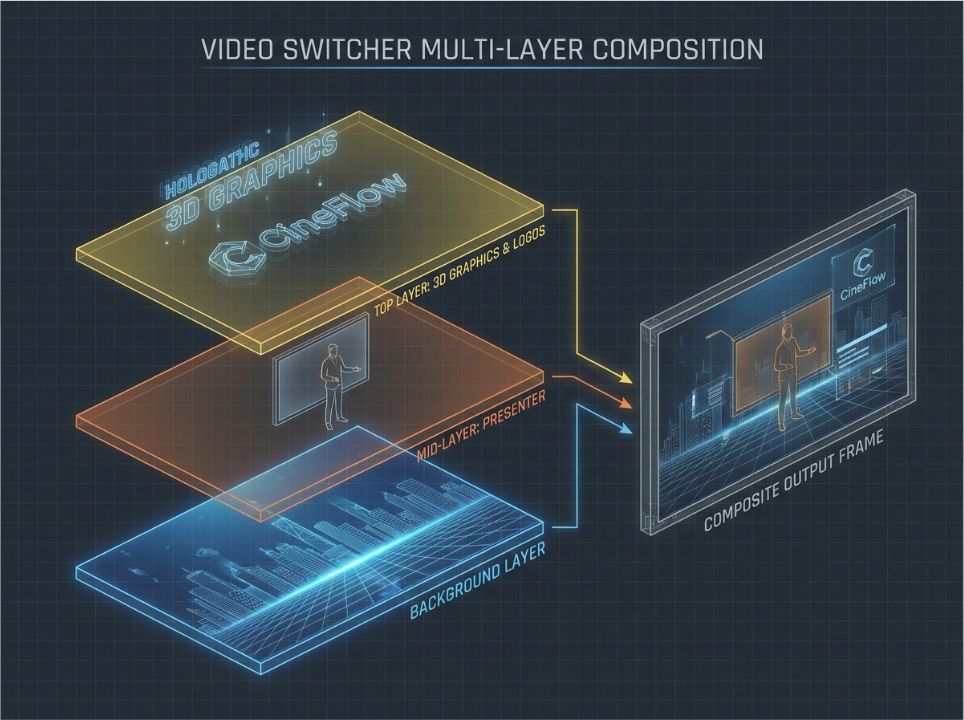
Multi-layer compositions
On production switchers engineered with multiple upstream keyers per M/E—where mid-range and professional models typically offer two to four independent key channels—technical directors (TDs) can orchestrate complex, multi-layered visual stacks. Processing these layers simultaneously at the USK level ensures the entire multi-source composition transitions seamlessly as a single, cohesive environment.
Key Types Available on the USK
The upstream keyer supports the most comprehensive range of keying modes available on a video switcher:
• Luma Key — Keys based on luminance (brightness) values; ideal for high-contrast graphics mapped on uniform black backgrounds.
• Linear Key (often referred to as Alpha Key) — Keys using a dual-signal setup (Fill and Key) with a dedicated alpha channel; delivers the highest anti-aliased edge quality for broadcast motion graphics.
• Chroma Key — Keys by isolating specific color hues (typically green or blue); the industry standard for virtual studio sets and green screen integration.
• Pattern Key — Keys utilizing the switcher’s internal pattern generator; primarily used to drive geometric wipe transitions and custom shaped mattes.
• DVE (Digital Video Effects) — Dynamically resizes, repositions, borders, and rotates a live video source within the 2D/3D space; essential for PiP and animated fly-in effects.
This extensive versatility solidifies the USK's role as the compositional workhorse of the production switcher—the primary layer where complex, multi-source environmental compositing is engineered.
Downstream Key (DSK): Always on Top
The downstream keyer—DSK for short—sits at the downstream end of the signal chain, completely inverted from the USK. It operates after the transition block, meaning its graphics are injected directly onto the final program output just before the signal exits the video switcher.
By default, this downstream routing grants the DSK its defining characteristic: architectural independence from the main mix/effects bus. Cut from Camera 1 to Camera 2, dissolve between two sources, or fire a complex wipe—the DSK layer remains stationary. It stays exactly where it is, layered over the fully processed program signal, unbothered by the primary transition activity happening underneath.
This is why the DSK is the natural home for global elements that need to persistently anchor the entire production—visual assets that must remain on screen regardless of what the technical director is doing with the background scenes.
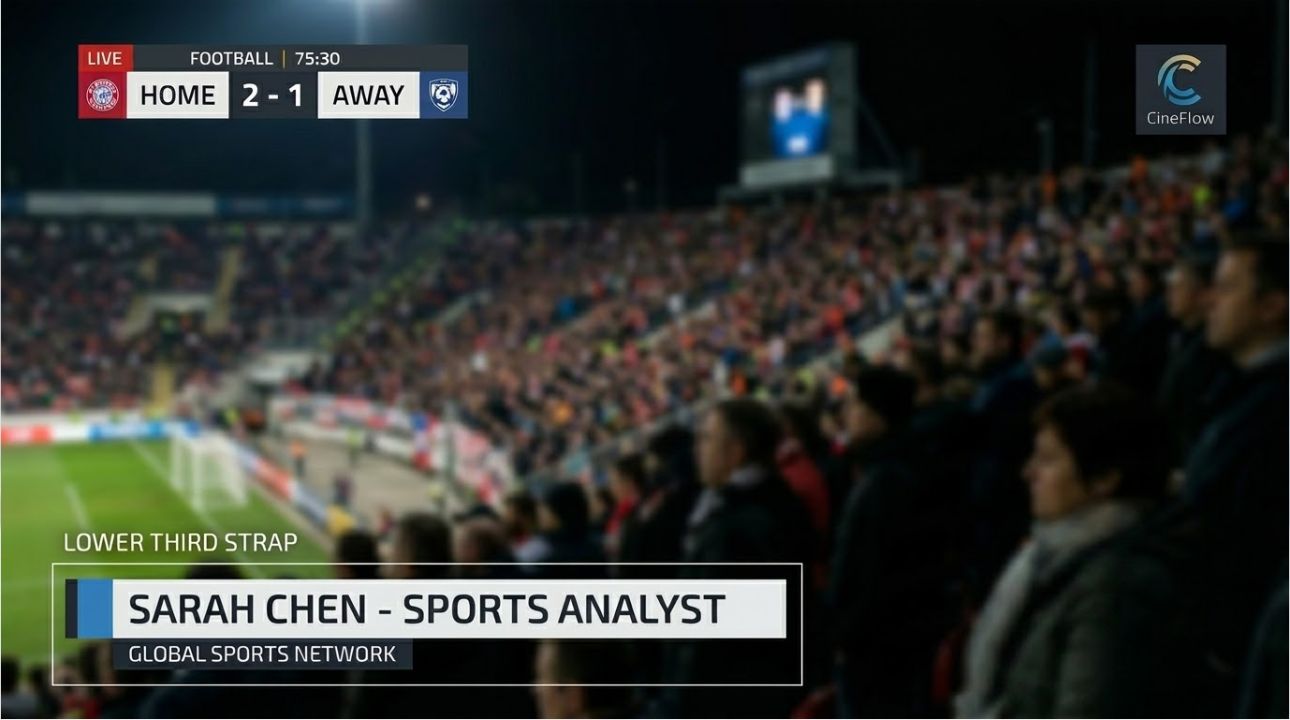
What the DSK Is Used For
Station logos and broadcast bugs
The channel logo sitting in the corner of a news broadcast is the textbook DSK application. It needs to be on screen continuously, across every camera cut, every transition, and every scene change. Downstream routing safeguards the graphic from vanishing accidentally—ensuring that even if the technical director takes an abrupt transition at speed, the brand bug remains completely unaffected.
Lower thirds
Name straps, titles, and location identifiers are typically keyed via the DSK. This architecture allows the technical director (TD) or graphics specialist to command these layers on and off-air independently using dedicated DSK controls, without impacting the primary switching workflow. The background video can blend and change freely while the lower third executes its own entry or exit animations on its own timing.
Scoreboards and data overlays
In sports production, real-time score bugs and statistical data matrices must maintain absolute visual continuity across rapid camera cuts and local background shifts. Routing these graphic engines through the DSK keeps them securely anchored to the program output, completely isolated from any tactical switching activity happening within the M/E bus.
Subtitles and closed captions
On-screen text overlays, such as open subtitles or translated translations that require uninterrupted readability across all underlying program content, are best managed at the DSK layer. Because the downstream keyer sits at the absolute terminal point of the internal processing chain, it guarantees that these critical text layers are rendered cleanly over every frame of the final broadcast.
Key Types Available on the DSK
Compared to the USK, the DSK’s practical options are structurally streamlined—and deliberately so. Because the DSK operates at the terminal end of the signal chain rather than inside the M/E bus, relying on advanced internal spatial manipulation is unnecessary. While some modern production switchers technically permit it, professional workflows strictly limit DSK utilization to two primary key types:
• Luma Key — The most ubiquitous DSK configuration; ideal for white or colored broadcast graphics mapped on solid black backgrounds, such as static logos and simple lower thirds exported from a local media pool.
• Linear Key (Alpha Key) — Employs a dual-signal setup (Fill and Key) for true alpha channel transparency. This is the industry standard when a high-end graphics generator outputs a separate alpha matte for impeccable edge blending.
Highly computational processes like Chroma Key, Pattern Key, and DVE are native upstream functions. If a production requires a green screen key or an animated DVE fly-in, that asset architecture fundamentally belongs within the USK, not the DSK.
USK vs. DSK: Side-by-Side Comparison
The table below maps the key differences between upstream and downstream keyers across the dimensions that matter most in a live production context.
Practical Decision Guide: USK or DSK?
Every graphic layer in a live production occupies a distinct position within the signal chain—and that routing is never arbitrary. Before assigning any visual asset to a keyer, a single operational question dictates its architectural placement:
"Should this layer transition alongside the background, or remain on screen independently of primary switching activity?"
If it transitions with the background → USK
If it stays on screen independently → DSK
USK
Upstream Keyer
Green screen and virtual backgrounds
Picture-in-Picture (PiP) windows
Chroma, Linear (Alpha), and Pattern keys
Graphics integrated into scene transitions
DSK
Downstream Keyer
Station logos and broadcast bugs
Lower thirds and name straps
Scoreboards and real-time data overlays
Open subtitles and text captions
Conclusion
USK and DSK are not interchangeable tools that do the same job in different ways. They are two distinct, intentional points in the signal chain, each engineered for a specific category of content. The architectural distinction between them follows a logic that, once mastered, applies consistently across every production switcher, every broadcast environment, and every graphic layer you will ever need to deploy.
The upstream keyer is an intrinsic part of the scene—what goes on it lives inside the M/E bus, participates in background transitions, and belongs to a specific camera composition. The downstream keyer is positioned above the scene—what goes on it sits persistently over the final program output, structurally independent of whatever primary switching occurs underneath.
Get that architectural routing right, and the rest of your production decisions follow automatically. Your brand bug stays anchored through every camera cut. Your green screen environment transitions flawlessly alongside the talent. Your lower thirds animate on and off-air on their own isolated timing without disrupting the primary switching workflow. None of this requires complex workaround configurations; it simply requires mapping each visual element to the keyer whose underlying signal flow matches what that asset needs to achieve.
That is the practical, real-world value of mastering switcher signal flow: not as an abstract technical concept, but as a reliable operational framework that makes every live production decision faster, cleaner, and entirely insulated from unexpected on-air surprises.