
Telycam × Panopto Integration
Recording a great lecture shouldn’t require a dedicated camera crew, complicated AV setups, or hours of post-production. With Telycam PTZ and USB conference cameras paired with Panopto‘s industry-leading video management platform, it doesn’t.
Telycam designs professional-grade PTZ and USB conference cameras built for real-world classroom, training room, and lecture hall environments — plug-and-play simplicity with broadcast-quality output. Panopto is the video platform trusted by hundreds of universities and enterprises worldwide to capture, manage, search, and deliver video content at scale. Together, they form a complete, end-to-end capture ecosystem: Telycam handles the hardware, Panopto handles everything after the record button is pressed.
Whether you’re deploying a single lecture hall or rolling out camera-enabled classrooms across an entire campus, Telycam and Panopto give your AV team, faculty, and IT administrators a unified, scalable solution — one that just works.
Key Integration Features
Plug-and-Play Compatibility — Zero Driver Friction
Telycam USB conference cameras are fully UVC-compliant — Panopto detects them instantly as standard video devices, no drivers or IT setup required. For network PTZ cameras, SSDP discovery makes IP-based models equally effortless to locate and configure across multi-room deployments. Faculty walk in, open Panopto, and the camera is ready.
AI Auto-Tracking Meets Automated Lecture Capture
Panopto’s scheduled recording starts and stops sessions automatically — Telycam’s built-in AI auto-tracking takes it further by keeping the presenter centered in frame throughout, with no camera operator needed. The result is a polished, professionally framed recording that runs on complete autopilot.
Live Streaming + Simultaneous Recording
Telycam PTZ cameras output NDI®HX, HDMI, and USB simultaneously, so live webcasting and cloud recording can happen through a single device at the same time. Paired with Panopto’s one-click webcasting, every session delivers two outputs automatically: a live stream for remote students and a searchable archived recording.
Multi-Source Capture for Any Room Configuration
Combine a Telycam USB camera for the instructor feed with a network PTZ for the whiteboard or audience — Panopto composites every source into one synchronized recording. Telycam’s lineup scales from huddle rooms to large auditoriums, so the same Panopto workflow runs in every room on campus.
Scheduled Recording with Camera Preset Integration
Save a position preset on your Telycam PTZ camera for each room, and it will be perfectly framed the moment a scheduled Panopto session begins — no staff presence required. Set it once; every recurring class records exactly the same way.
LMS Integration — From Camera to Student in One Step
When a session ends, Panopto automatically processes, captions, and publishes the recording directly to Canvas, Moodle, Blackboard, or D2L — no manual upload needed. Students get immediate access to lecture content inside the platform they already use every day.
Find Your Setup: Telycam Cameras for Every Educational Scenario
Every school has different recording needs — and the right camera setup makes all the difference. This video breaks down which Telycam models work best for each educational scenario, from online micro-learning and live in-class streaming to large-scale campus events. Once you’ve found the setup that fits your environment, connecting it to Panopto is the easy part.
Try It Now: Panopto Express + Telycam USB Camera
No software. No account. No setup. Just plug in and record.
Connect any Telycam USB conference camera to your computer, and it’s instantly recognized — no drivers, no configuration. Head to panopto.com/record in your browser, and your Telycam camera and microphone are already available and ready to go.
From there, Panopto Express lets you:
- Record video from your Telycam camera with a live preview
- Capture audio via the camera’s built-in microphone or any connected mic
- Record your screen alongside the camera feed — perfect for lecture slides or demos
- Set a virtual background directly in the browser
- Use Smart Camera mode to automatically adjust framing for a single speaker or a group
- Download your recording as an MP4 when done — no watermarks, no time limits, and Panopto doesn’t retain your file
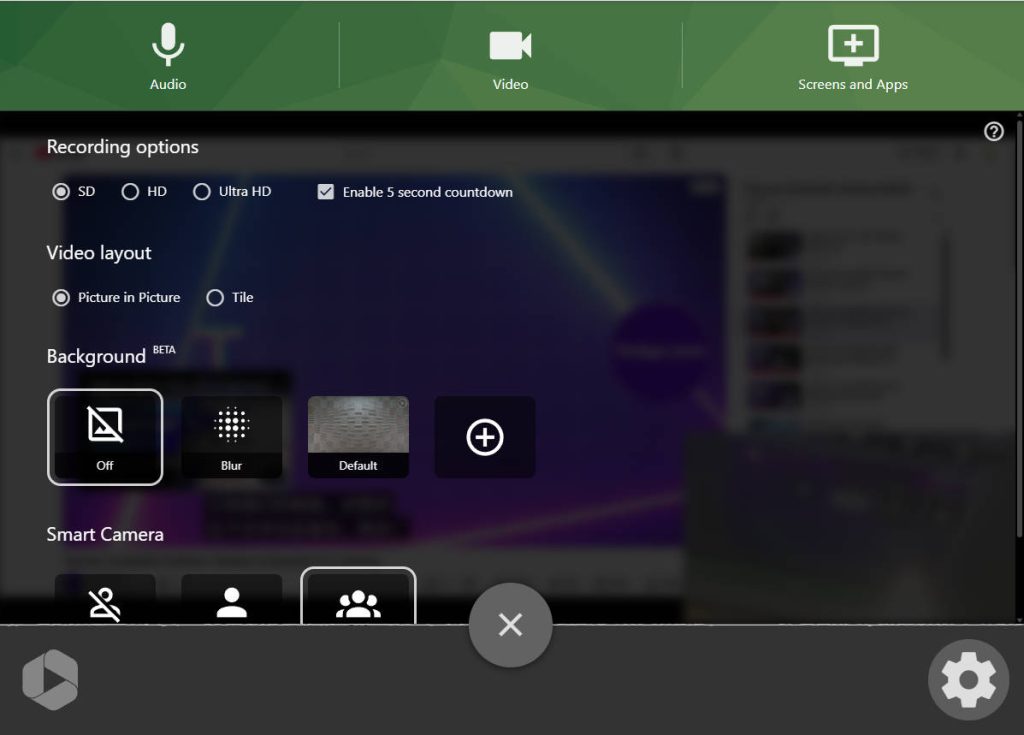
It’s the fastest way to see Telycam and Panopto working together — and a genuinely useful standalone recording tool for educators who just need to hit record.
For more tutorials on getting started with Panopto, visit the Panopto Video Tutorial Library →
From Record to Replay —
Everything Already Works Together
Telycam cameras and Panopto were built for the same mission: making professional video production accessible to everyone, in every room, without the need for a full production team. With verified hardware compatibility, plug-and-play USB connectivity, and support for live streaming, scheduled automation, and AI-powered auto-tracking, this is a pairing that removes friction at every step — from the moment a session begins to the moment a student presses play.
Ready to build your lecture capture environment? Explore Telycam’s full camera lineup to find the right model for your rooms, or reach out to our team for a personalized deployment recommendation.
Contact Telycam
Sales Inquiries
sales@telycam.com
Call Us
+86-755-33275155